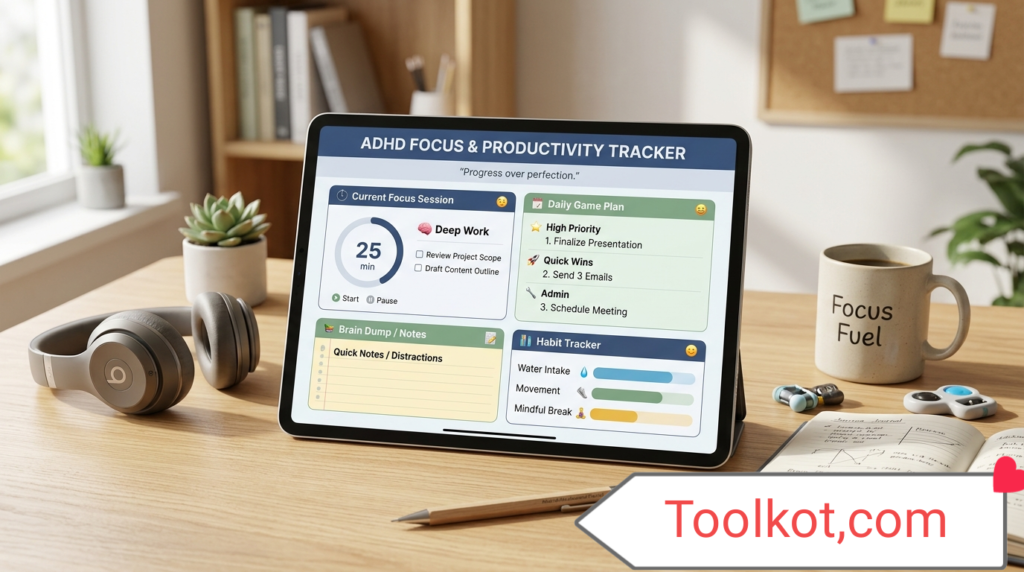
ADHD Focus & Productivity Tracker
A premium, zero-cost advanced tool to master your attention, log distractions, and execute tasks with hyperfocus.
⏱️ Hyperfocus Timer
🧠 Distraction Logger
Lost focus? Log the thought quickly to get it out of your head and return to work.
📝 Priority Task Dump
📊 Productivity Data
Current Daily Streak: 0 sessions
What is the ADHD Focus & Productivity Tracker?
The ADHD Focus & Productivity Tracker is an advanced, premium-level web application designed specifically to help individuals with Attention Deficit Hyperactivity Disorder (ADHD), as well as professionals and students, master their workflow. Unlike standard timers, this tool integrates scientifically backed productivity methods like the Pomodoro Technique with specialized psychological tools such as a "Distraction Logger" and an instant "Brain Dump" task matrix.
By forcing your browser into a dedicated productivity dashboard, it eliminates context switching. Best of all, this tool operates entirely within your browser. It costs absolutely zero, requires no subscriptions, and ensures maximum privacy as no personal data is sent to external servers.
How to Use This Tool
Getting started with this fully functional snippet is incredibly straightforward:
- Step 1: Clear Your Mind. Use the "Priority Task Dump" input field to write down everything you need to do. Press 'Add' to build your list.
- Step 2: Choose Your Mode. Select a timer mode. Click "🍅 25m Pomodoro" for standard tasks, or "🔥 50m Hyperfocus" for deep, uninterrupted work.
- Step 3: Start the Session. Click the green "Start" button and begin working strictly on your first task.
- Step 4: Log Distractions. If a random thought, urge, or notification interrupts you, immediately type it into the "Distraction Logger" and click "Log It". This acknowledges the thought without derailing your current task.
- Step 5: Review and Export. At the end of the day, export your completed tasks and logged distractions to a CSV file to analyze your productivity patterns.
Use Cases: Who Benefits From It?
This tool is highly beneficial for a wide range of users:
- Individuals with ADHD: Provides external structure, visual time cues, and a safe space to park intrusive thoughts without losing momentum.
- Students and Academics: Ideal for structuring study sessions, writing essays, and managing reading assignments through dedicated hyperfocus intervals.
- Remote Workers & Freelancers: Helps separate work time from break time while working from home, logging distractions like chores or social media urges.
- Developers and Writers: Perfect for maintaining "flow state." If a new idea pops up, they can log it instantly and return to coding or writing.
10 Premium Pro-Level Features Built-In
While many premium apps charge monthly fees, this zero-cost tool includes 10 advanced features out of the box:
- Dual-Mode Timer System: Seamlessly switch between 25-minute Pomodoro sprints and 50-minute Hyperfocus marathons.
- One-Click Distraction Logger: A dedicated mental "scratchpad" to park intrusive thoughts and maintain your current focus.
- Integrated Brain Dump: A localized task manager to organize chaotic thoughts into actionable items.
- Local Data Persistence: Your tasks and streaks are automatically saved to your browser's Local Storage. Your data remains safe even if you accidentally refresh the page.
- CSV Data Export: Download a comprehensive daily report of your tasks and distractions directly to your device for self-analysis.
- Daily Session Streak Tracker: Gamify your productivity. The tool tracks your completed work sessions to build momentum and habits.
- Dynamic Visual Interface: Built with a full-width, zero-distraction layout ensuring zero sidebar or footer interference.
- Zero-Latency Execution: Because the tool relies on raw, pure JavaScript within your Astra Pro environment, actions are performed instantly without pinging external databases.
- Cross-Device Compatibility: Perfectly responsive. Whether on a desktop monitor or a mobile browser, the interface adapts flawlessly.
- One-Click Social Sharing: Easily share your productivity sessions or the tool itself with accountability partners via WhatsApp and Gmail.
Benefits of Using the Tracker
Consistent use of this tool rewires how you approach work. By externalizing your memory (using the task list) and your impulses (using the distraction logger), you reduce cognitive load. This leads to reduced burnout, higher quality output, and a profound sense of accomplishment as you watch your Daily Streak increase. Furthermore, the transparent, high-contrast design ensures minimal eye strain and maximum readability.
15 Important FAQ's About This Tool
1. Is this tool completely free to use?
Yes. This is a 100% free, premium-level tool with zero hidden costs, subscriptions, or demo limitations.
2. Do I need to create an account?
No account is required. The tool works instantly in your browser without any registration process.
3. Where is my data stored?
All data (tasks, distractions, streaks) is stored locally in your browser's cache (Local Storage). Nothing is sent to our servers, ensuring total privacy.
4. Will I lose my data if I refresh the page?
No. Thanks to the Local Data Persistence feature, your tasks and distraction logs will remain intact upon page refresh.
5. Can I use this on my mobile phone?
Absolutely. The tool is fully mobile browser compatible, adapting its layout for seamless use on any smartphone or tablet.
6. How does the Distraction Logger work?
When an unrelated thought enters your mind (e.g., "pay electricity bill"), you type it into the logger instead of acting on it. This frees up your working memory to continue focusing on your main task.
7. What is Hyperfocus mode?
Hyperfocus mode sets a 50-minute uninterrupted timer. It is designed for deep work phases where 25 minutes (standard Pomodoro) is too short to reach peak productivity.
8. How do I export my productivity report?
Simply click the "Export CSV Report" button. The tool will automatically generate and download a spreadsheet containing your logged tasks and distractions.
9. Is it compatible with the Astra Pro Theme?
Yes. Custom CSS overrides have been written specifically to ensure it integrates perfectly with Astra Pro, forcing a clean, full-width, distraction-free environment.
10. How does the streak counter work?
Every time you successfully let a timer reach 0:00 without resetting it, your daily session streak goes up by one, encouraging you to maintain focus.
11. Does the timer run if I switch browser tabs?
Yes, standard browser mechanics allow the timer to continue counting down even if you switch tabs, though staying on the tool page is recommended for maximum focus.
12. Can I share this tool with friends?
Yes, use the dedicated WhatsApp and Gmail sharing buttons included in the dashboard to quickly send the tool link to study partners.
13. What happens when the timer reaches zero?
The timer will reset to 00:00, your streak counter will increment, and you can then choose to start a 5-minute break timer.
14. Why is the background transparent and text black?
This design choice guarantees the highest possible contrast ratio for reading, prioritizing accessibility and minimizing visual overwhelm, which is crucial for ADHD users.
15. Are there any external redirects?
No. Every single action is performed strictly within your website URL. The tool does not redirect or refer you to external websites.
Conclusion
Mastering focus in a world full of digital noise is a challenge, particularly for those dealing with ADHD. The ADHD Focus & Productivity Tracker bridges the gap between intention and execution. By providing a clean, fast, and feature-rich environment directly within your browser, it acts as a digital anchor. Utilize the Hyperfocus timer, dump your distracting thoughts, and watch your daily productivity streak grow. Start your first session today and take control of your time.
🛠️ Tool Developed & Maintained by Professional Expert.
For custom web development, support, or help, contact me directly:
📧 Email: majidfarooq295@gmail.com
📱 WhatsApp/Cell: +92 314 668 5547